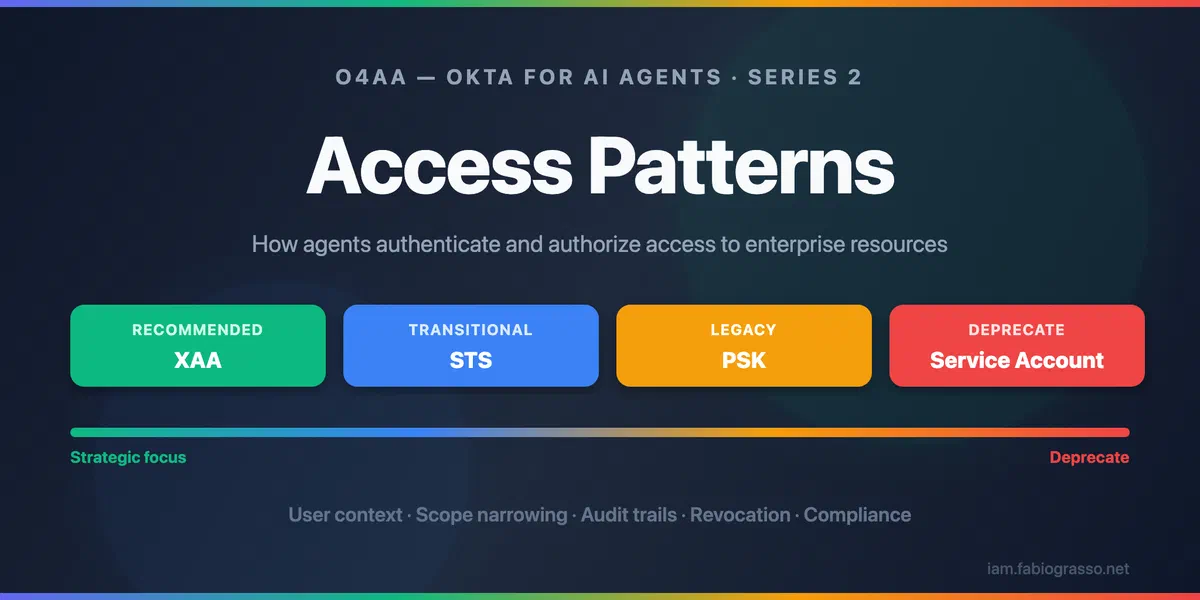

Okta for AI Agents: Access Patterns
  1. Posts/
  2. Blog/

Okta for AI Agents: Access Patterns

Fabio Grasso
Author
Fabio Grasso
Solutions Engineer specializing in Identity & Access Management (IAM) and cybersecurity.
Table of Contents
O4AA - Okta for AI Agents - This article is part of a series.
Part 2: This Article

Choosing the Right Access Pattern
#

In my previous article on the Agentic Enterprise Blueprint, I explored how Okta positions AI agents as first-class identities within the enterprise security fabric. I examined the strategic framework answering three foundational questions: Where are my agents? What can they connect to? What can they do?

But strategy without execution is just theory. Now I want to answer a more practical question: How should AI agents authenticate and authorize their communications with enterprise resources?

This guide is designed to help architects, security teams, and solution engineers evaluate the four access patterns Okta for AI Agents provides for AI agent integrations. By the end, you’ll understand:

  • Which pattern fits your security requirements (user context, scope narrowing, audit trails)
  • Which pattern your resources support (ID-JAG, OAuth, API keys, or username/password)
  • How to compare security levels between patterns
  • When to migrate from legacy patterns to modern approaches

This question isn’t academic. The access pattern you choose determines:

  • Whether your audit logs capture user attribution: Can you trace an action back to both the agent and the user it acted for?
  • Whether you can revoke access surgically: Can you disable a single user’s access to one agent without affecting others?
  • Whether your architecture complies with regulatory requirements: Does your implementation satisfy NIST SP 800-63-41, the EU AI Act2, NIS23, DORA4 traceability mandates?

Consider this scenario: Your security team is investigating a data access incident. An AI agent accessed sensitive customer records at 3:47 AM. With the wrong access pattern, your audit logs might show only service-account-agent accessed database With the right pattern, you see sales-representative-agent, acting on behalf of john@example.com, accessed customer record #12847 with read scope, transaction ID jti-7z9x2q8.

Okta for AI Agents (O4AA) provides four distinct access patterns, each optimized for different security models, resource capabilities, and compliance requirements5. The choice isn’t arbitrary: it’s a fundamental architectural decision that shapes your agent security posture.

Let’s examine each pattern, understand when to use it, and see how they fit into a coherent access strategy.


Access Patterns at a Glance
#

The Okta for AI Agents (O4AA) platform offers four ways for an agent to reach a downstream resource. Each one is configured as a Managed Connection attached to the agent’s workload principal in Okta. Picking the right pattern comes down to three factors:

  1. What does the downstream resource support? (XAA, ID-JAG, OAuth, API key, username/password)
  2. Is user-level context required? (Audit attribution, per-user scope narrowing)
  3. What are your security and governance requirements? (Compliance profile, revocation granularity)

The Four Patterns
#

PatternRecommendationUser ContextBest For
Cross App Access (XAA)โœ… Recommendedโœ… YesInternal APIs, MCP servers, ISV-enabled SaaS
Secure Token Service (STS)๐Ÿ”„ Transitionalโœ… YesThird-party SaaS with OAuth
Pre-Shared Key (PSK)โš ๏ธ LegacyโŒ NoAPI-key-only services, legacy REST APIs
Service Account๐Ÿšซ DeprecateโŒ NoUsername/password-only systems (last resort)
Direction

XAA is where there is the strongest maturity and security. Every upcoming capability builds on the same ID-JAG exchange that XAA introduced. The strongest signal? The MCP specification chose XAA as its enterprise authentication model in May 20256, making it a de facto industry standard.
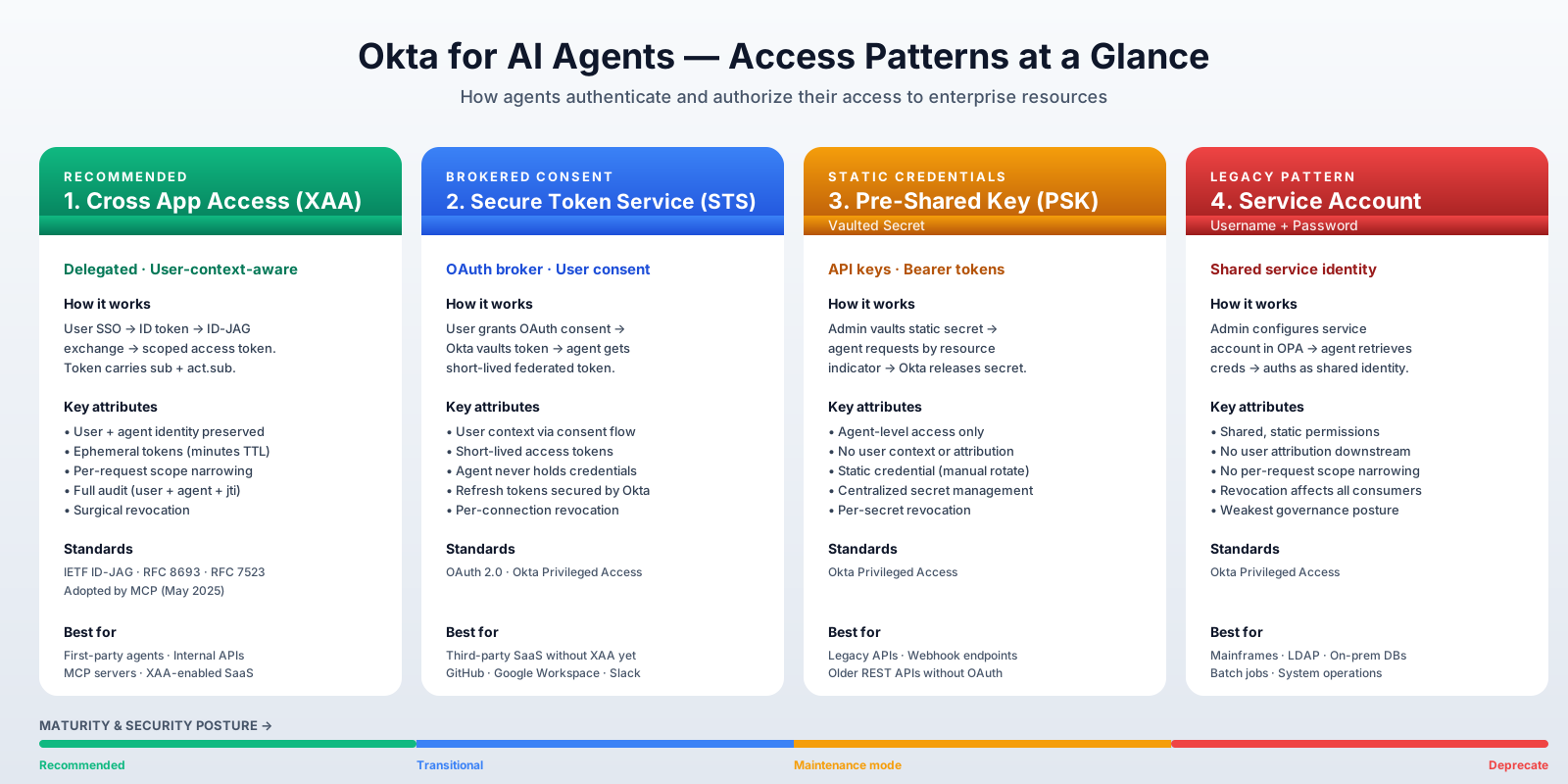
Access Patterns Overview

Let’s dive into each pattern, explore how they work, when to use them, and look at real-world use cases and configuration examples to help you implement the right access strategy for your AI agents.


Cross App Access (XAA)
#

Cross App Access (XAA) is the flagship access pattern for Okta for AI Agents. It implements user-delegated, user-context-aware access through the Identity Assertion JWT Authorization Grant (ID-JAG), an emerging IETF standard for secure delegation7.

Cross App Access Overview

Why XAA Matters
#

XAA is the first access pattern to embed full identity context at every hop in an agent workflow. Every token carries both:

  • sub: The user identity (who authorized this action)
  • act.sub: The agent identity (which agent is acting on their behalf)

This dual-identity structure enables capabilities impossible with traditional service accounts:

  • Per-user audit attribution: Every agent action is traceable to the specific user who authorized it
  • Surgical revocation: Disable one user’s access to one agent without affecting other users or agents
  • Scope narrowing: The token’s effective permissions are the narrowest overlap of what the agent is allowed, what the user is entitled to, and what the specific task requires
  • Regulatory compliance: Complete audit trails satisfying NIST SP 800-63-41, EU AI Act2, NIS23, and DORA4 traceability requirements

How XAA Works: The ID-JAG Flow
#

The XAA flow involves a token exchange sequence where Okta vouches for the user’s identity to the target resource’s authorization server.

sequenceDiagram
    autonumber
    actor User
    participant Client as ๐Ÿค– Client
(AI Agent) box rgba(243, 242, 247,0.3) Okta Cloud participant IdP as ๐Ÿ” IdP AS
(Okta Org AS) participant AS as ๐Ÿ›ก๏ธ Resource AS
(Custom AS) end participant RS as ๐Ÿ“ฆ Resource Server
(Protected API) Note over User, RS: Step 1: User Authentication (SSO) User->>Client: Login via SSO (OIDC) Client->>IdP: OIDC authentication IdP-->>Client: ID Token (sub: user@example.com) Note over User, RS: Step 2: Token Exchange (RFC 8693) Client->>IdP: Token Exchange Request Note right of Client: grant_type:token-exchange
subject_token:ID_Token
requested_token_type:id-jag
audience:Resource AS IdP->>IdP: Validate ID Token Note right of IdP: private_key_jwt
managed connection policy IdP->>IdP: Generate ID-JAG IdP-->>Client: ID-JAG (Identity Assertion) Note left of IdP: sub:user
aud:Resource AS
client_id:agent Note over User, RS: Step 3: JWT Bearer Grant (RFC 7523) Client->>AS: JWT Bearer Request Note right of Client: grant_type:jwt-bearer
assertion:ID-JAG
scope:orders:read AS->>AS: Validate ID-JAG Note left of AS: aud match
client_id match
signature (JWKS) AS->>AS: Apply Authorization Policy AS-->>Client: Access Token Note left of AS: sub + act.sub + scope
ephemeral Note over User, RS: Step 4: API Call Client->>RS: API call (with Access Token) RS->>RS: Validate Token (JWKS) RS-->>Client: Response data Client-->>User: Display Data

Step-by-step breakdown
#

  1. User authenticates (SSO): The user logs in via OIDC through the AI Agent. The Okta Org AS issues an ID Token containing the user’s identity (sub: user@example.com).
  2. Token exchange at Okta (RFC 8693): The agent authenticates with its own workload credentials (private_key_jwt) and requests a token exchange (grant_type: token-exchange, subject_token: ID Token, requested_token_type: id-jag, audience: Custom AS). Okta validates the ID Token, checks the managed connection policy, and generates an ID-JAG โ€” a signed JWT containing sub (user), aud (Custom AS), and client_id (agent).
  3. JWT Bearer grant at Custom AS (RFC 7523): The agent presents the ID-JAG to the Custom AS’s token endpoint (grant_type: jwt-bearer, assertion: ID-JAG, scope: orders:read). The Custom AS validates the ID-JAG signature via JWKS, confirms aud and client_id match, applies its local authorization policy, and mints an ephemeral access token with sub + act.sub.
  4. API call: The agent calls the protected resource with the scoped access token. The resource validates the token via JWKS and returns data. The response flows back through the agent to the user.
IETF Naming and Okta Counterparts

This diagram uses the role names from the ID-JAG specification. Here’s how each IETF role maps to Okta’s implementation:

IETF RoleOkta Counterpart
ClientThe AI Agent (or its frontend/orchestration layer) โ€” the workload principal registered in Okta
IdP ASOkta’s Org Authorization Server, backed by Universal Directory and Okta SSO
Resource ASA Custom Authorization Server in Okta, protecting downstream APIs
Resource Server (RS)The protected resource โ€” an internal API, MCP server, or third-party API

In practice, the “Client” box represents multiple components working together: a frontend application (chat UI, web app) handling user authentication via OIDC, an orchestration layer managing conversation state and tool calls, and one or more backend agents (workload principals) performing the token exchanges. I collapsed them into a single box to keep the focus on the protocol flow rather than internal architecture.

The ID-JAG Standard
#

ID-JAG (Identity Assertion JWT Authorization Grant) is based on several IETF standards:

  • RFC 8693: OAuth 2.0 Token Exchange
  • RFC 7523: JWT Profile for OAuth 2.0 Client Authentication
  • IETF draft-02: Identity JWT Authorization Grant specification

For a comprehensive overview of Cross App Access and how it fits into the OAuth ecosystem, see the OAuth.net Cross App Access reference.

The key innovation is the act claim, which captures the actor (agent) identity separately from the subject (user) identity. This enables a clean separation of “who is this action for” versus “what system is performing the action.”

Token Structure
#

A typical XAA access token contains:

{
  "sub": "john@example.com",
  "act": {
    "sub": "sales-representative-agent",
    "aud": "okta.com"
  },
  "aud": "crm-orders-api",
  "scope": "orders:read accounts:read",
  "jti": "s2r3d4x3m6a0q1l",
  "iat": 1735571312,
  "nbf": 1735571312,
  "exp": 1735571468
}
ClaimPurposeAudit/Compliance Value
subUser identityAnswers: “Which user authorized this action?”
act.subAgent identityAnswers: “Which agent performed this action?”
audTarget resourceAnswers: “What system was accessed?”
scopeGranted permissionsAnswers: “What operations were permitted?”
jtiTransaction IDUnique identifier for correlation across systems
expExpiration (minutes)Ensures ephemeral access; limits blast radius
Scope Narrowing in Action

An agent running for a sales manager might have access to orders:read, orders:write, and accounts:read. But when processing a specific task (“list my open deals”), the request can be narrowed to just orders:read. The effective permission is always the intersection of what the agent can do, what the user can do, and what this specific request needs.

Audit and Compliance Benefits
#

When using XAA, Okta’s system logs capture rich context for every access event, including both the user and agent identities, the scopes requested, the target resource, and a unique transaction ID for correlation. The EventType app.oauth2.token.grant.id_jag specifically indicates when an ID-JAG exchange occurred, providing a clear audit trail for agent actions.

Let’s see an example of an actual XAA event log entry from Okta’s system logs:

Full Okta System Log entry for an ID-JAG exchange (click to expand)
{
  "actor": {
    "id": "wlpxnnu00000B6vxs1d7",
    "type": "PublicClientApp",
    "alternateId": "unknown",
    "displayName": "Pricing Agent",
    "detailEntry": null
  },
  "client": {
    "userAgent": {
      "rawUserAgent": "python-requests/2.33.1",
      "os": "Unknown",
      "browser": "UNKNOWN"
    },
    "zone": "null",
    "device": "Unknown",
    "id": null,
    "ipAddress": "x.x.x.x",
    "geographicalContext": {
      "city": "Ashburn",
      "state": "Virginia",
      "country": "United States",
      "postalCode": "20149",
      "geolocation": {
        "lat": 39.0469,
        "lon": -77.4903
      }
    }
  },
  "displayMessage": "OAuth 2.0 Identity Assertion Authorization Grant is granted",
  "eventType": "app.oauth2.token.grant.id_jag",
  "outcome": {
    "result": "SUCCESS",
    "reason": null
  },
  "published": "2026-04-16T19:27:49.919Z",
  "securityContext": {
    "asNumber": 14618,
    "asOrg": "amazon.com  inc.",
    "isp": "amazon.com  inc.",
    "domain": "amazonaws.com",
    "isProxy": false,
    "ipDetails": {
      "asNumber": 14618,
      "asOrg": "amazon.com  inc.",
      "isp": "amazon.com  inc.",
      "domain": "amazonaws.com"
    }
  },
  "severity": "INFO",
  "debugContext": {
    "debugData": {
      "clientAuthType": "private_key_jwt",
      "grantedScopes": "pricing:margin",
      "subjectTokenIssuer": "https://xxx.oktapreview.com",
      "subjectTokenType": "urn:ietf:params:oauth:token-type:id_token",
      "clientId": "wlpxnnu00000B6vxs1d7",
      "responseTime": "213",
      "requestedTokenType": "urn:ietf:params:oauth:token-type:id-jag",
      "authorizationServerAudience": "https://xxx.oktapreview.com/oauth2/ausxnnacdm60nV7vv1d7",
      "requestUri": "/oauth2/v1/token",
      "requestedScopes": "pricing:margin",
      "tokenExchangeType": "Agent ID Assertion",
      "url": "/oauth2/v1/token?",
      "managedConnectionId": "mcnxnodu9t2FRZO5R1d7",
      "subjectTokenId": "ID.kiJ9Ch3aBer2ftX2CobkLuSSPqBMdMsZaxwRMZQjr44",
      "subjectTokenClientId": "0oaxnnekviMmWpyBK2d3",
      "requestId": "5eaf3d96ff3dbb684e1099bf8cecdd53",
      "dtHash": "96dec87ffaebc55e64ab62eca30303c555d589e0f9686d55827963c51032ef7f",
      "threatSuspected": "false",
      "grantType": "urn:ietf:params:oauth:grant-type:token-exchange"
    }
  },
  "legacyEventType": null,
  "transaction": {
    "type": "WEB",
    "id": "5eaf3d96ff3dbb684e1099bf8cecdd53",
    "detail": {}
  },
  "uuid": "5b10a39b-39ca-11f1-bbfb-f341db467931",
  "version": "0",
  "request": {
    "ipChain": [
      {
        "ip": "x.x.x.x",
        "geographicalContext": {
          "city": "Ashburn",
          "state": "Virginia",
          "country": "United States",
          "postalCode": "20149",
          "geolocation": {
            "lat": 39.0469,
            "lon": -77.4903
          }
        },
        "version": "V4",
        "source": null,
        "ipDetails": {
          "asNumber": 14618,
          "asOrg": "amazon.com  inc.",
          "isp": "amazon.com  inc.",
          "domain": "amazonaws.com"
        }
      }
    ]
  },
  "target": [
    {
      "id": "ID.kiJ9Ch3aBer2ftX2CobkLuSSPqBMdMsZaxwRMZQjr44",
      "type": "id_token",
      "alternateId": null,
      "displayName": "ID Token",
      "detailEntry": {
        "audience": "0oaxnnekviMmWpyBK2d3",
        "expires": "2026-04-16T20:07:29.000Z",
        "subject": "00uxnn7b13YEcYj2V6a7",
        "hash": "iMQM1uCzsH07nFhkRPUNvg"
      }
    },
    {
      "id": "00uxnn7b13YEcYj2V6a7",
      "type": "User",
      "alternateId": "fabio.grasso@example.com",
      "displayName": "Fabio Grasso",
      "detailEntry": null
    },
    {
      "id": "IDAAG.5ZazR5P-fmm8zuG1CwuqT3EenUx1pFfN00jToEE0s6A",
      "type": "id_jag",
      "alternateId": null,
      "displayName": "Identity Assertion JWT Authorization Grant",
      "detailEntry": {
        "audience": "https://xxx.oktapreview.com/oauth2/ausxnnacdm60nV7vv1d7",
        "expires": "2026-04-16T19:32:49.000Z",
        "subject": "00uxnn7b13YEcYj2V6a7",
        "scope": "pricing:margin",
        "hash": "Tq7wccRtqpRvZvEXKYK9nA"
      }
    }
  ]
}

As you can see, not only the agent that made the request (Pricing Agent) but also the user that authorized the action (fabio.grasso@example.com). The grantedScopes field shows the effective permissions granted to the agent for this request, which is the intersection of what the agent can do and what the user is entitled to. The jti claim in the token becomes the transaction.id in the logs, allowing you to correlate this event with downstream events in your resource’s logs if they also log the transaction ID.

XAA Use Cases
#

Let’s see some concrete examples of how XAA can be used to secure different types of resources:

  1. Internal API via MCP Server - A customer support agent needs to access the internal order database to answer customer queries.
    • Agent registered in Okta Universal Directory
    • MCP Server protected by Okta Custom Authorization Server
    • XAA flow: Agent exchanges user’s ID Token for scoped access to orders:read
    • Audit: Every query logged with user ID, agent ID, and transaction ID
  2. First-Party SaaS (ISV-Enabled) - A sales assistant agent accessing Salesforce opportunities on behalf of a sales rep.
    • Salesforce implements ID-JAG validation
    • Agent presents ID-JAG to Salesforce authorization endpoint
    • Salesforce issues scoped token for the user’s data only
    • No static credentials; no shared service accounts
  3. Multi-Step Agent Workflows - A finance agent executes an approval workflow:
    • Step 1: Read expense report (read:expenses scope)
    • Step 2: Check budget availability (read:budgets scope)
    • Step 3: Submit approval (write:approvals scope)
    • Each step can request different scopes. If the agent is compromised mid-workflow, revocation stops only that user’s session without affecting others.
ISV Adoption in Progress

XAA is fully functional today for Okta Custom Authorization Servers (connection type: “Authorization Server”) and MCP Servers (connection type: “MCP Server”). ISV adoption for third-party SaaS integrations is currently in progress. Major vendors are actively working on ID-JAG support.

Start building on XAA now so you’re ready to extend to SaaS integrations as soon as ISVs complete their implementations. Until then, use STS (connection type: “Application”) for third-party SaaS that supports OAuth but not yet ID-JAG.

Testing XAA: The xaa.dev Playground
#

Okta provides an interactive testing environment at xaa.dev where you can experiment with XAA flows without infrastructure setup8.

Features:

  • Browser-based testing (no Docker or local configuration)
  • Pre-configured components: Requesting App, Resource App, IdP
  • Get started in under 60 seconds
  • Register your own custom clients for testing

The playground includes a sample flow where “Bob Tables” creates and manages tasks through an AI agent, demonstrating the full ID-JAG exchange.

ID-JAG and XAA: A Note on Naming
#

You’ve likely seen “ID-JAG” and “XAA” used interchangeably across documentation, blog posts, and conference talks. They’re closely related โ€” but not the same thing.

Think of it like calling any adhesive bandage a “Band-Aid” regardless of the manufacturer: the leading product becomes the generic term for the category. Something similar is happening here.

ID-JAG (Identity Assertion JWT Authorization Grant) is the OAuth extension being standardized through the IETF. It defines precisely how identity providers issue assertion tokens that applications can exchange for access tokens. Any IdP can implement ID-JAG โ€” it’s an open standard, and the spec belongs to the whole industry.

XAA (Cross-App Access) is Okta’s product name for their implementation of ID-JAG. Okta has been a real force behind both the IETF standardization effort and early industry adoption โ€” their engineering investment and developer advocacy have made “XAA” the term most people encounter first, and the one that tends to stick as shorthand for the extension.

The practical distinction matters: XAA is one implementation of an open standard. When you read Okta documentation, “XAA” refers to Okta’s product. When you read the IETF draft or a third-party integration guide, “ID-JAG” refers to the underlying specification that any organization can implement.

XAA Limitations
#

  • ISV adoption in progress: XAA is GA on the Okta side, but third-party SaaS integrations require ISV support. Major vendors are actively implementing ID-JAG, building on XAA today ensures you’re ready when they ship.

  • Token lifetime vs. long-running sessions: Tokens are ephemeral and expire in minutes, requiring new exchanges for each request. This is by design (limits blast radius) but may impact agents that cache credentials.

  • Not suitable for: Agents that must operate offline or cache credentials indefinitely. For these scenarios, consider STS with careful credential lifecycle management.


Secure Token Service (STS)
#

Secure Token Service (STS) enables agents to access third-party SaaS applications that support OAuth but haven’t yet adopted XAA. Okta acts as a secure broker, vaulting user-consented tokens and providing short-lived federated access at runtime.

When to Use STS
#

  • Third-party SaaS with OAuth support but no ID-JAG support yet (e.g., as today, GitHub, Google Workspace, Slack)
  • User-level context is required for audit and compliance
Tip

Regularly check with your SaaS vendors about their roadmap for ID-JAG support. STS is a bridge, not a destination. The goal is to migrate to XAA as soon as the vendor supports it.

How STS Works
#

sequenceDiagram
    autonumber
    actor User
    participant Okta as Okta (Token Broker)
    participant ThirdParty as Third-Party SaaS
    participant Agent as AI Agent

    rect rgb(240, 248, 255)
        Note over User,ThirdParty: One-Time Consent Flow
        User->>Okta: Authenticate
        Okta->>ThirdParty: OAuth Authorization Request
        ThirdParty-->>User: Consent Screen
        User-->>ThirdParty: Approve access
        ThirdParty-->>Okta: Authorization Code
        Okta->>ThirdParty: Exchange for tokens
        ThirdParty-->>Okta: Access + Refresh Tokens
        Okta->>Okta: Vault tokens (Privileged Access)
    end

    rect rgb(255, 248, 240)
        Note over Agent,ThirdParty: Runtime Agent Access
        Agent->>Okta: Request access (workload identity)
        Okta->>Okta: Validate managed connection policy
        Okta-->>Agent: Short-lived federated token
        Agent->>ThirdParty: API call with token
        ThirdParty-->>Agent: Response
    end

Step-by-step breakdown
#

  1. One-time consent: User authenticates and consents to the third-party service
  2. Token vaulting: Okta secures the access and refresh tokens in Okta Privileged Access
  3. Runtime access: Agent authenticates to Okta with its workload principal
  4. Token exchange: Okta issues a short-lived federated token for the downstream service
  5. API access: Agent calls the third-party API with the short-lived token, crucially, user credentials never touch the agent

STS Use Cases
#

  1. GitHub โ€” A coding assistant agent reads repositories and creates pull requests on behalf of developers. The developer consents once via GitHub’s OAuth screen; Okta vaults the resulting tokens. At runtime, the agent receives a short-lived federated token to call GitHub’s API โ€” it never holds long-lived GitHub credentials.
  2. Google Workspace โ€” A scheduling agent manages calendar events and drafts emails for a user. User context is preserved through the consent flow, so Google’s audit logs capture which user authorized the agent’s actions.
  3. Jira/Confluence โ€” A project management agent creates tickets from Slack conversations and updates documentation pages. The agent authenticates through Okta’s brokered token, never storing Atlassian credentials directly.

Key difference from XAA
#

  • Consent flow: STS requires the user to go through the third-party’s OAuth consent screen; Okta then stores and manages those tokens on behalf of the agent. XAA skips the consent screen entirely. Delegation happens at agent registration time in Okta.
  • Audit trail: STS captures user consent and agent access in Okta logs, but the third-party service may only see the agent identity. XAA provides full user+agent context to the resource.
  • Token lifetime: The federated token issued to the agent is short-lived (minutes) to limit risk, but the underlying access/refresh tokens in Okta may have longer lifetimes depending on the third-party service’s policies.
  • Revocation: Revoking access requires deleting the vault entry in Okta, which may affect all agents using that connection. No per-user revocation within the third-party service.
  • Scope narrowing: The agent receives whatever scopes the user consented to during the OAuth flow. Okta can’t dynamically narrow scopes per request like XAA.
User Context Preserved

Unlike Pre-Shared Key, STS preserves user context through the consent flow. Audit logs capture both the user who consented and the agent that accessed the resource.

Strategic Direction

STS is explicitly a transitional bridge pattern. Once an ISV or SaaS vendor ships ID-JAG support, you can upgrade that connection from STS to XAA without re-architecting. Until then, STS gives you user-level context that Pre-Shared Key and Service Account simply can’t provide.


Pre-Shared Key (PSK) or Vaulted Secret
#

Pre-Shared Key (PSK) stores static credentials (API keys, bearer tokens, webhook secrets) in Okta Privileged Access (OPA). The agent retrieves secrets at runtime rather than embedding them in code or configuration.

When to Use Pre-Shared Key
#

  • Legacy REST APIs that only support API key authentication
  • Webhook endpoints requiring bearer tokens
  • Third-party integrations with static token auth
  • Early-phase services that will eventually add OAuth

How Pre-Shared Key Works
#

sequenceDiagram
    autonumber
    participant Admin as Admin
    participant Okta as Okta (Privileged Access)
    participant Agent as AI Agent
    participant Resource as Protected Resource

    rect rgb(240, 255, 240)
        Note over Admin,Okta: Configuration Phase
        Admin->>Okta: Create & vault secret (API key)
        Admin->>Okta: Create managed connection on agent
    end

    rect rgb(255, 248, 240)
        Note over Agent,Resource: Runtime Access
        Agent->>Okta: Authenticate (workload principal)
        Okta->>Okta: Validate managed connection policy
        Okta-->>Agent: Release secret
        Agent->>Resource: API call with secret
        Resource-->>Agent: Response
    end

Step-by-step breakdown
#

  1. Admin vaults the secret: An administrator stores the API key or bearer token in Okta Privileged Access and creates a managed connection on the agent (type: Secret)
  2. Agent authenticates: At runtime, the agent authenticates to Okta with its workload principal identity
  3. Policy check: Okta validates the agent’s identity and checks the managed connection policy
  4. Secret released: Okta releases the vaulted credential to the agent
  5. Direct resource access: The agent uses the static credential to call the downstream resource directly โ€” no token exchange, no user context
Password rotation

When possible (i.e. for supported SaaS Services) configure the vault to automatically rotate credentials. This reduces risk if a credential is compromised, but requires the downstream service to support credential updates without downtime.

Pre-Shared Key Limitations
#

  • No user context: Resource sees agent identity only, not the user
  • No scope narrowing: Agent has full access granted to the credential
  • Limited audit trail: Logs show agent access, not user attribution
Plan Migration

Pre-Shared Key has limited audit trail and no user context. Plan migration to XAA or STS as downstream services add OAuth support. This pattern should be treated as temporary for legacy integrations.


Service Account
#

Service Account uses username and password credentials linked to a shared service identity. This is the legacy pattern that Okta explicitly recommends migrating away from.

How Service Account Works
#

sequenceDiagram
    autonumber
    participant Admin as Admin
    participant Okta as Okta (Privileged Access)
    participant AgentA as Agent A
    participant AgentB as Agent B
    participant Resource as Protected Resource

    Admin->>Okta: Create service account (svc_agent@example)
    Admin->>AgentA: Register with managed connection
    Admin->>AgentB: Register with managed connection

    AgentA->>Okta: Request credentials
    AgentB->>Okta: Request credentials
    Okta-->>AgentA: Username/Password
    Okta-->>AgentB: Username/Password

    AgentA->>Resource: Authenticate as svc_agent@example
    AgentB->>Resource: Authenticate as svc_agent@example

    Note over Resource: Both appear as same identity!

Step-by-step breakdown
#

  1. Admin provisions service account: An administrator configures a service account in Okta Privileged Access and creates managed connections on one or more agents
  2. Agent requests credentials: At runtime, each agent authenticates to Okta and requests the service account credentials
  3. Okta releases username/password: Okta validates the agent’s identity, checks policy, and hands over the shared credentials
  4. Agent authenticates to resource: The agent logs into the downstream resource as the service account โ€” indistinguishable from any other agent using the same credentials

Service Accounts Limitations
#

Service Accounts present four critical security gaps:

  1. Invisible agents: Multiple agents share a single identity, making it impossible to tell which one performed an action
  2. Excessive permissions: Service accounts typically carry broad, static privileges that far exceed what any single task requires
  3. Missing user attribution: Compliance audits can’t answer “which user triggered this data access?”
  4. All-or-nothing revocation: Deactivating the service account kills access for every agent and system that depends on it
Not Recommended

Service Accounts are not as secure as the authorization server or vaulted secret resource types. New integrations should never default to this pattern.

When Service Account is Unavoidable
#

  • Legacy systems requiring username/password authentication (on-prem databases, mainframes, LDAP-backed services)
  • Batch processing with no end-user context
  • Systems that have not adopted any modern authentication method

Service Account is acceptable only for batch processes with no user context, with a documented sunset plan.

Service Account vs Pre-Shared Key - The key conceptual distinction

Both patterns lack user context and lack scope narrowing, but they differ in the type of credential stored and the security posture:

  • PSK vaults a machine-native credential (API key) that is typically unique per integration, so rotation and revocation stay surgical. Credentials are scoped to one integration, so you can have multiple PSKs for different agents, to guarantee at least agent-level attribution (audit) and isolation (i.e. for revocation). Okta Privileged Access can automatically rotate PSKs if the downstream service supports it, which is a huge security win.

  • Service Account borrows a human-shaped credential (username/password) to impersonate a shared identity: multiple agents share the same login, which is exactly what breaks per-agent attribution and forces all-or-nothing revocation. Passwords are typically long-lived and require manual rotation, which is a risk if the credential is compromised. Service accounts are often over-provisioned with broad permissions to avoid breaking dependent agents, which amplifies risk further.

That is why moving from Service Account to PSK is the first defensible step on the migration ladder, even though neither pattern carries user context.


Strategic Recommendations
#

Pattern Comparison Matrix
#

DimensionXAASTSPSKService Account
User context in tokenโœ… Full (sub + act.sub)โœ… Via consent flowโŒ NoneโŒ None
Scope narrowingโœ… Dynamic, per-requestโš ๏ธ Fixed at connection timeโŒ NoneโŒ None
Token lifetimeโœ… Ephemeralโœ… Short-lived access tokensโŒ Static secretโŒ Static password
Audit depthโœ… Full (User + agent + transaction ID)โœ… Partial (User + agent)โš ๏ธ Agent identity onlyโŒ Shared service identity
Revocation precisionโœ… Per-user, per-agent, per-sessionโš ๏ธ Per-connectionโš ๏ธ Per-secretโŒ All-or-nothing
ISV adoption neededโš ๏ธ Yes (ID-JAG validation)โœ… No (standard OAuth)โœ… No (API key)โœ… No (user/pass)
Okta roadmap focusโœ… Strategic focus๐Ÿ”„ Transitional (Bridge to XAA)โš ๏ธ Legacy support๐Ÿšซ Deprecate
Permission modelโœ… User-delegated: effective permissions = intersection of agent, user, and task-level scopesโš ๏ธ User-consentedโš ๏ธ Agent-levelโŒ Shared service identity
Connection typeAuthorization Server or MCP ServerApplicationSecretService Account
StandardsIETF ID-JAG (draft-02), RFC 8693, RFC 7523OAuth 2.0N/A (API key management)N/A (username/password)
Regulatory Alignment

NIST SP 800-63-45, EU AI Act6, NIS27, and DORA8 emphasize continuous monitoring and user attribution. XAA aligns directly with these requirements. Service Account patterns may require compensating controls to meet compliance thresholds.

Decision Framework
#

The framework prioritizes patterns by security posture: XAA provides the strongest guarantees, while Service Account represents the weakest (and should be treated as temporary).

---
config:
  layout: dagre
---
flowchart TB
    A["Does resource support ID-JAG?"] -- Yes --> XAA["โœ… Use XAA
User-delegated, full audit,
surgical revocation"] A -- No --> B["Does resource support OAuth 2.0?"] B -- Yes --> STS["๐Ÿ”„ Use STS
User-consented token brokering"] B -- No --> C["Does resource support API keys?"] C -- Yes --> PSK["โš ๏ธ Use PSK
Vaulted secret"] C -- No --> SA["๐Ÿšซ Service Account
Only option - plan migration immediately"] A@{ shape: hex} B@{ shape: hex} C@{ shape: hex} style XAA fill:#d4edda,stroke:#28a745 style STS fill:#E1BEE7,stroke:#0d6efd style PSK fill:#fff3cd,stroke:#ffc107 style SA fill:#f8d7da,stroke:#dc3545

Implementation Sequencing
#

Here’s a recommended roadmap for transitioning to XAA while maintaining security and compliance:

  • Phase 1: Audit existing integrations
    • Map all agent connections to one of the four patterns
    • Identify service accounts and pre-shared keys
  • Phase 2: New integrations default to XAA
    • Use STS only when XAA isn’t supported
    • Use Service Account, or Pre-Shared Key only when absolutely necessary
    • Document rationale for non-XAA choices
  • Phase 3: Monitor ISV roadmaps
    • As ISVs adopt ID-JAG, migrate STS connections to XAA
    • Track adoption announcements
  • Phase 4: Service Account and Pre-Shared Key sunset
    • Establish formal deprecation timeline
    • Migrate to STS as intermediate step
    • Target zero service accounts for user-context workloads
Info

Okta for AI Agents (O4AA) can help you during this transition, providing a unified platform to discover and manage all four patterns while you modernize your architecture. Start with XAA for new integrations and use O4AA’s flexible managed connections to bridge legacy systems as you migrate.
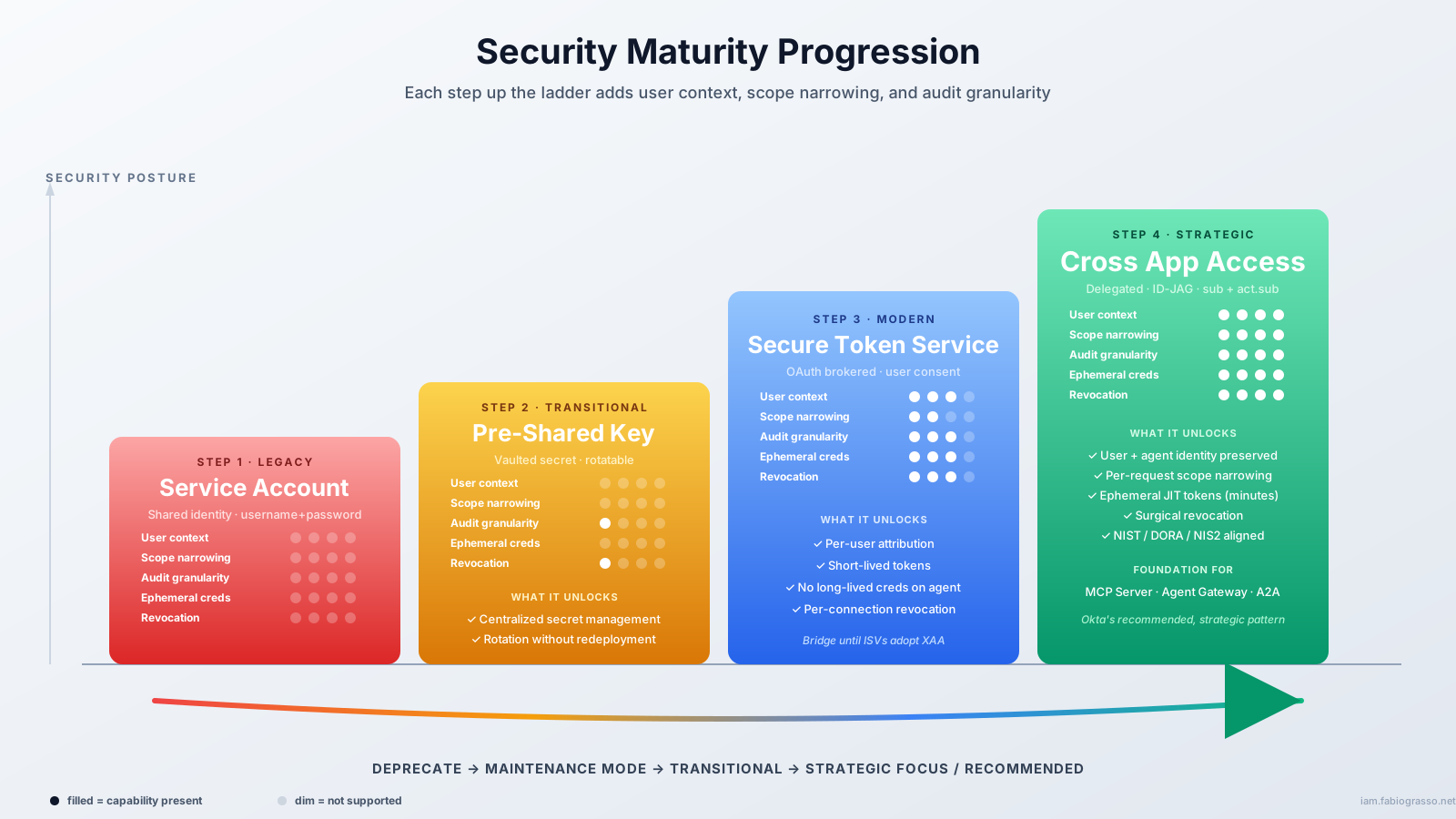
Security Maturity Progression
The journey from Service Account to XAA represents a security maturity progression: each step adds user context, scope narrowing, and audit granularity

From Theory to Practice: Configuring Access Patterns in Okta
#

In Okta’s Universal Directory, you can register AI agents as workload identities and create Managed Connections that define how they access downstream resources. Each connection type corresponds to one of the access patterns I’ve discussed above.

AI Agents ListAI Agent Detail
Okta Universal Directory - AI Agents List
Okta Universal Directory - AI Agent Detail

When you create a managed connection, you’ll see five resource types. They map to the four access patterns covered in this article:

O4AA Connection Options
Connection TypeAccess PatternWhat It Does
Authorization ServerXAA (Cross App Access)Agent gets scoped tokens from an Okta Custom Authorization Server via ID-JAG exchange
SecretPre-Shared Key (PSK)Agent retrieves a vaulted API key or bearer token from Okta Privileged Access
Service AccountService AccountAgent retrieves username/password credentials for a service identity vaulted in Okta Privileged Access
ApplicationSTS (Secure Token Service)Agent accesses an OIN app or custom resource server through Okta-brokered OAuth token exchange
MCP ServerXAA (Cross App Access)Same ID-JAG exchange as Authorization Server, specialized for the MCP protocol surface
MCP Server = XAA for MCP

The MCP Server connection type is not a separate access pattern: it’s XAA applied specifically to Model Context Protocol servers. The same ID-JAG delegation model, token structure (sub + act.sub), and policy enforcement apply. Okta provides a dedicated connection type to streamline MCP-specific configuration.

XAA Configuration Overview
#

Implementing XAA requires:

  1. Register the agent in Okta Universal Directory as a workload principal
  2. Create a Managed Connection and select “Authorization Server” (for custom APIs) or “MCP Server” (for MCP endpoints). Both use the same ID-JAG exchange under the hood.
  3. Configure the Custom Authorization Server protecting your resource
  4. Define RBAC policies that evaluate both user and agent attributes

Example policy logic, to ensure the agent can only access sales data when the user is a member of the sales team:

IF (act.sub == "sales-representative-agent")
AND (sub IN groups["sales-team"])
AND (requested_scope IN ["sales:read", "accounts:read"])
THEN issue_token_with_scope
ELSE deny

This is a pseudo-code example. In the Okta Admin Console, Custom Authorization Server access policies use a policy + rule model โ€” not a scripting language. To follow the example you can:

  1. Create an Access Policy assigned to the agent’s AI Agent (i.e., sales-representative-agent). This implicitly scopes the policy to that specific agent (act.sub).
  2. Create a Rule within that policy:
    • Grant type: JWT Bearer (the ID-JAG exchange grant)
    • User eligibility: Users member of group: sales-team โ€” this ensures only sales team members can delegate access through this agent
    • Scopes: Allowlist of orders:read and accounts:read โ€” the agent can’t request broader scopes even if the user has them
    • Token lifetime: 5 minutes (ephemeral)
    • Evaluation: Policies and rules are evaluated in priority order. The first match wins. If no rule matches (e.g., a user outside sales-team tries to use this agent), the request is denied.

The result: the agent can only access sales data when the user behind the request is a member of the sales team. The effective permissions are the intersection of the policy’s scope allowlist, the user’s group membership, and the agent’s managed connection.

STS Configuration
#

In the Okta admin console, you configure STS by creating a managed connection with the “Application” resource type, selecting an OIN app integration or a custom resource server9. Okta then brokers the OAuth token exchange between the agent and the third-party service.

Pre-Shared Key Configuration
#

In the Okta admin console, you configure PSK by creating a managed connection with the “Secret” resource type. The API key or bearer token must first be stored in Okta Privileged Access; the managed connection then references that vaulted secret. At runtime, the agent retrieves the credential on demand โ€” it is never hardcoded in the agent’s code or configuration.

Service Account Configuration
#

In the Okta admin console, you configure a Service Account connection by creating a managed connection with the “Service Account” resource type, linking it to a service account identity stored in Okta Privileged Access. Because multiple agents can reference the same service account, treat this as a last resort and document a clear sunset plan before deploying it.


Conclusions
#

The choice of access pattern isn’t a technical detail: it’s an architectural decision that shapes your AI agent security posture for years to come.

Key takeaways:

  1. XAA is the future: User-delegated, auditable, compliant. Investing in XAA now means your architecture is ready for MCP Server and Agent-to-Agent support the moment they land.

  2. STS bridges the gap: For third-party SaaS that supports OAuth but not ID-JAG, STS provides user context while you wait for ISV adoption.

  3. Pre-Shared Key is acceptable for legacy: API-key-only services need vaulted secrets, but plan migration as resources modernize.

  4. Service Account is technical debt: Every service account is a compliance gap waiting to surface in an audit. Start planning your exit.

The journey from Service Account โ†’ Pre-Shared Key โ†’ STS โ†’ XAA represents a security maturity progression. Each step up the ladder adds user context, scope narrowing, and audit granularity.

XAA will also be the foundation for future capabilities like Agent-to-Agent Access (A2A), Kill Switch (global token revocation), Human-in-the-Loop (HITL) workflows. Starting with XAA means you’re not just securing today’s integrations, but also future-proofing for tomorrow’s innovations.


Getting Started
#

Test XAA Today
#

Explore the interactive XAA playground at xaa.dev, no setup required. Experience the full ID-JAG flow in your browser.

Learn More
#

Join the Conversation
#

Which integrations in your environment are still using service accounts? Have you started mapping your agent connections to these access patterns? Where are you in that journey?

Share your experience in the comments below or connect with me on LinkedIn to continue the discussion.

O4AA - Okta for AI Agents - This article is part of a series.
Part 2: This Article

Powered by Hugo Streamline Icon: https://streamlinehq.comHugo Hugo & Blowfish