
Introduction #
In Okta Privileged Access platform release 2026.04.0, deployed on April 07, 2026, Okta introduced Workload Identity for Automation.1
Okta’s launch blog describes the same shift as moving away from static keys and toward trusted workload attestation.2 The idea is important: automated workloads can authenticate with their native platform identity and a runtime OIDC token, instead of relying on hardcoded API keys or long-lived service account secrets.
CI/CD pipelines, deployment jobs, infrastructure automation, cloud services, and AI agents often need privileged access. They may need to connect to a Linux server over SSH, run a controlled maintenance command, or trigger an operational task. The traditional pattern is simple: put a secret somewhere the workload can read it. It works, but it leaves a familiar question behind: what protects the secret that unlocks the secret store?
Okta Privileged Access Workloads3 changes the starting point. A workload proves what it is at runtime. Okta Privileged Access validates that proof, maps it to a workload role, evaluates policy, and issues short-lived access for the resource the workload is allowed to use.
I also created a small GitHub Actions lab to validate the SSH flow and keep the implementation details concrete.4 I will use it here as a reference, but the goal of this post is still the architecture: how Workloads changes the way we authorize non-human access.
In this article I will explain:
- what Workloads are in Okta Privileged Access
- why this matters for CI/CD, automation, and AI agents
- how workload connections, roles, policy, and the CLI fit together
- how the pattern applies to Principal SSH access, AI agents, and CI/CD such as GitHub Actions
Why Workload Identity Matters #
A workload is an automated process that needs access to infrastructure without a human sitting in front of it. Think of:
- GitHub Actions, GitLab CI, CircleCI, or Jenkins jobs
- Ansible, Terraform, Puppet, or custom automation scripts
- cloud workloads running in Google Cloud Platform or Azure
- scheduled jobs that perform operational tasks
- agentic or tool-driven automation that executes commands under guardrails
Unlike a human user, a workload cannot complete MFA, approve a push notification, or explain why it needs access. It must authenticate non-interactively. That makes the quality of its identity proof critical.
The old pattern usually looks like this:
- Store an API key, SSH private key, or service account secret in the CI/CD platform.
- Let the job read that static credential.
- Use it to access a vault, PAM tool, server, or cloud resource.
This is better than hardcoding secrets directly in scripts, but it does not fully solve the bootstrap problem. The first credential is still long-lived, sensitive, and often broadly scoped. If it leaks, an attacker may not need to compromise a human identity at all.
Workload identity replaces that static bootstrap credential with a runtime identity document. For example, GitHub Actions can issue an OIDC token for a specific workflow run. That token includes claims about the repository, branch, workflow, environment, and run context. Okta Privileged Access can validate those claims and decide whether this exact workload is trusted.5
---
config:
  layout: elk
---
flowchart LR

subgraph s2["OPA Workloads"]
  direction LR
  OIDC["CI/CD OIDC Token"] -- runtime --> OPA["Okta Privileged Access"]
  OPA --> Policy["Policy Evaluation"]
  Policy -- Short-lived Access --> Resource3["Server SSH"]
  Policy -. Future use cases .-> Resource4["Secrets, databases, Kubernetes"]
end

subgraph s1["Old Pattern"]
  direction LR
  Static["Static CI/CD Secret"] --> Vault["Vault or PAM"]
  Vault --> Resource1["Server"]
  Vault --> Resource2["Secret"]
  Static <-. bootstrap credential risk .-> Risk["Long-lived credential"]
end
The goal is not to pretend automation no longer needs secrets. It does. The goal is to remove standing credentials from the authentication path when the workload platform can provide cryptographic proof of identity.
The OPA Workloads Model #
Workloads in Okta Privileged Access are built around four practical components:
| Component | Purpose |
|---|---|
| Workload Connection | Defines which external identity provider is trusted and which JWT claims must match. |
| Workload Role | Maps verified workload attributes to a logical principal used by policy. |
| Policy | Decides which resources the workload role can access. Today, the tested workload access pattern is Principal SSH access to servers. |
| CLI execution | Lets the workload authenticate and use access non-interactively. |
This structure is important because it separates setup from governance. DevOps teams usually know the source platform and the pipeline details. Security teams own the trust boundary and policy. Okta’s setup flow reflects that separation: a DevOps admin can create and test a workload connection in Draft state, while a security admin promotes it to Active and defines authorization through workload roles and policies.6
Administrative Flow #
The setup flow is easier to understand as four phases.
1. Connect #
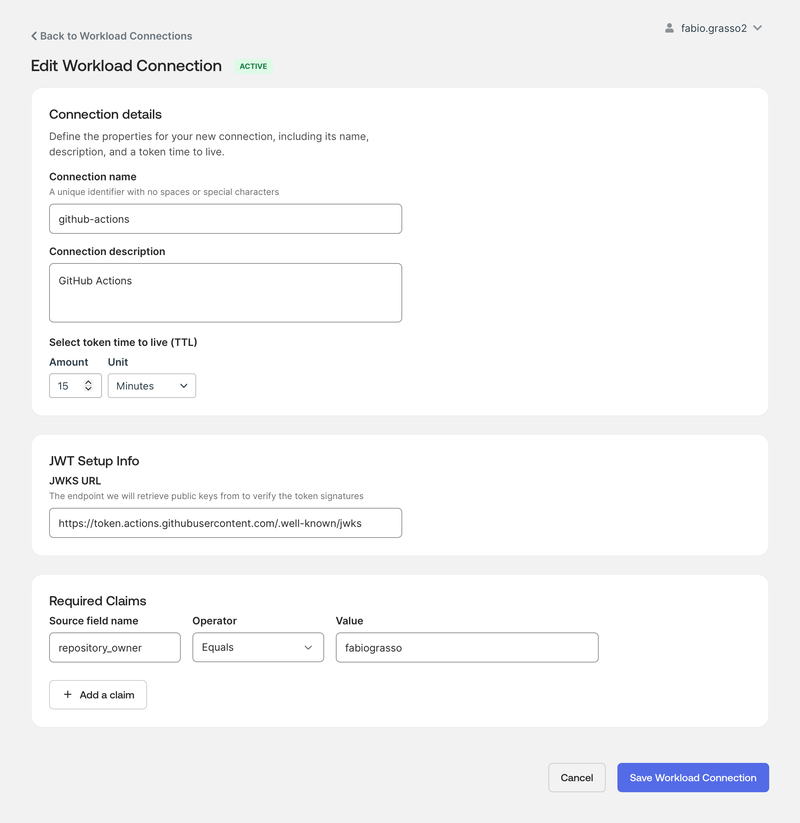
The DevOps admin creates a workload connection. For common platforms, Okta can provide a guided setup. For generic JWT integrations, you define the JWKS URL and the required claims yourself.
For a GitHub Actions connection, the important validation elements are typically:
- issuer
- audience
- repository or organization
- branch, tag, workflow, or environment
- token signature through the provider JWKS URL
The security principle is simple: do not trust “anything from GitHub” or “anything from this cloud.” Trust the narrowest runtime identity that matches the automation you want to authorize.
2. Govern #
The connection starts in Draft. Draft mode lets the team test JWT validation without issuing a usable access token. When the security admin activates the connection, it can issue valid Okta Privileged Access tokens. Okta notes that after activation, the DevOps admin loses admin rights to that connection, while the security admin can switch it between Active and Inactive.5
This is a healthy control. The team that builds the pipeline can prepare the integration, but the security team approves the trust boundary.
3. Map #
The security admin creates a workload role. This role groups matching workloads into a logical identity.
For example:
- connection:
github-actions-prod - role:
prod-deployer - conditions: repository is
fabio/example-app, branch ismain, workflow isdeploy.yml
Once created, the workload role becomes a principal in Okta Privileged Access policy.7
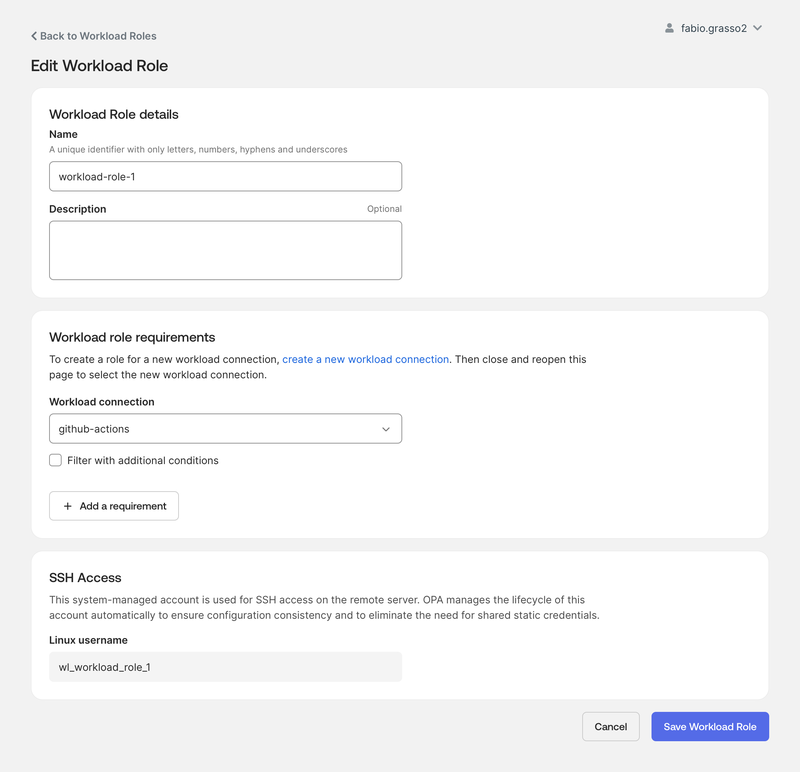
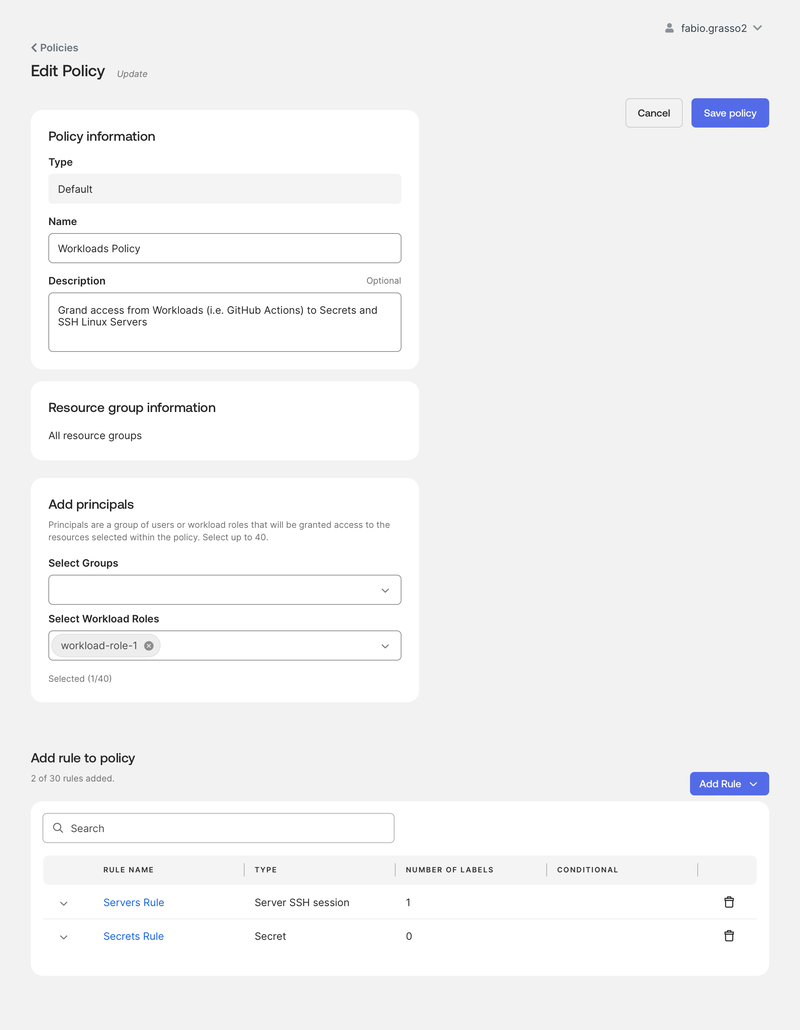
The workload role is then selected in an OPA policy, exactly as you would select other principals. This is where the trust decision becomes an authorization decision: which servers should this workload role reach?
4. Execute #
At runtime, the automation calls the Okta Privileged Access CLI. The documented command is sft workload authenticate, with sft wl authenticate as the shorter form.8
OPA_TOKEN=$(sft wl authenticate \
  --team "<opa-team>" \
  --connection "<workload-connection-name>" \
  --jwt-env "<environment-variable-containing-jwt>" \
  --role-hint "<workload-role-name>")
That command is the bridge between the platform identity token and OPA-managed access. The next section shows the full runtime sequence.
Runtime Flow #
At runtime, the sequence is fully non-interactive:
- The platform starts the workload.
- The workload obtains a signed identity token from its native platform.
- The OPA client sends that token to Okta Privileged Access.
- Okta validates the token signature and required claims.
- Okta maps the workload to a workload role.
- Policy decides whether the workload can access the resource.
- The workload uses short-lived access to complete the task.
sequenceDiagram
    participant Job as Automation Job
    participant IdP as Platform Identity Provider
    participant CLI as OPA Client CLI
    participant OPA as Okta Privileged Access
    participant Policy as Policy Engine
    participant Target as Server

    Job->>IdP: Request runtime OIDC token
    IdP-->>Job: Signed workload identity JWT
    Job->>CLI: sft wl authenticate
    CLI->>OPA: Present JWT, connection, role hint
    OPA->>OPA: Validate signature and claims
    OPA->>Policy: Evaluate workload role access
    Policy-->>OPA: Allow or deny
    OPA-->>CLI: Issue short-lived token
    CLI->>Target: Use authorized access
Access Patterns #
Today, the available Workloads access pattern I can validate is Principal SSH access for automated workloads. This is also the use case implemented in the lab repository.
Additional use cases, such as OPA secret retrieval, database access, Kubernetes access, and other automation patterns, are expected to arrive later. I will update this article and the lab when they are available and tested.
Principal SSH Access #
With Principal SSH access, workloads can connect to managed Linux servers using a system-managed username derived from the workload role. Okta documents the wl_ prefix for these workload users. For example, prod-deployer maps to wl_prod-deployer.
The username is provisioned just in time and used with short-lived SSH credentials.9 Server logs can show the workload identity boundary, and policy changes matter: if a workload role loses access while a session is active, Okta documentation indicates the active SSH session can be terminated.
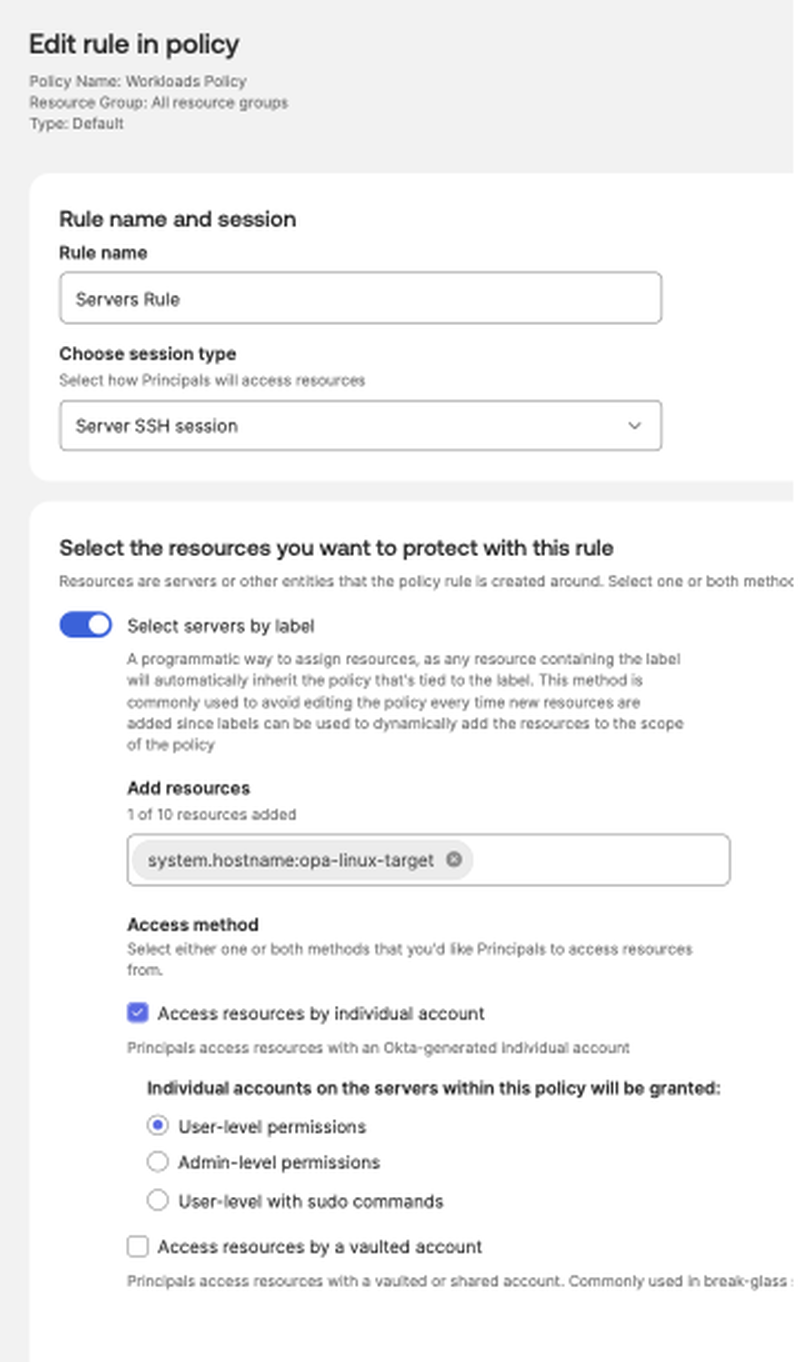
The lab policy grants a Server SSH session rule to a Linux target selected by label. This is the important operational detail: the pipeline does not get broad SSH access; it gets access to the servers selected by policy.
Here is a minimal CI-friendly pattern after sft wl authenticate has already exported OPA_TOKEN:
export OPA_TARGET_SERVER="prod-web-01"
export RELEASE_ID="${GITHUB_SHA:-manual-run}"

mkdir -p "${HOME}/.ssh"
chmod 700 "${HOME}/.ssh"

# Append OPA-managed SSH configuration for this runner.
sft ssh-config >> "${HOME}/.ssh/config"
chmod 600 "${HOME}/.ssh/config"

# Run a non-interactive deployment check on the target server.
sft ssh "${OPA_TARGET_SERVER}" --command "
  set -euo pipefail
  echo \"Connected as: \$(whoami)\"
  echo \"Host: \$(hostname)\"
  sudo systemctl status example-app --no-pager
  echo \"Ready for release ${RELEASE_ID}\"
"
On GitHub-hosted runners, the lab uses script to allocate a pseudo-terminal before running sft ssh. That avoids some CI terminal edge cases:
script -q -e -c \
  "sft ssh '${OPA_LINUX_TARGET}' --command 'whoami && hostname && uname -a'" \
  /dev/null
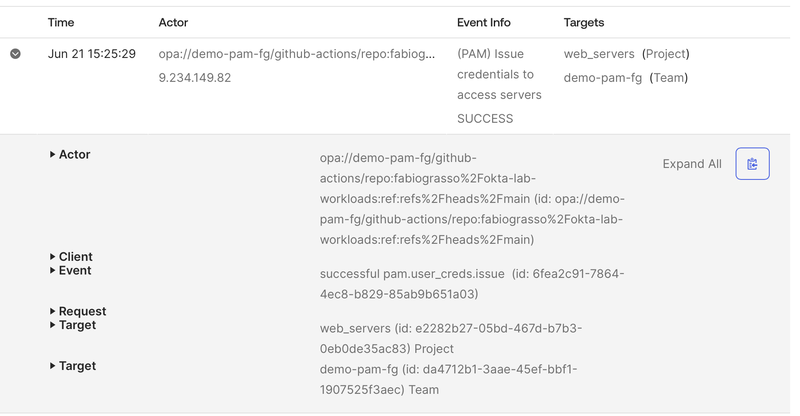
After a successful run, the OPA System Log shows the workload principal as the actor. That is the auditability benefit in practice: the event is not just “some shared SSH key connected.” It includes the workload identity boundary.
Upcoming Use Cases #
OPA secrets, databases, Kubernetes, and additional workload automation patterns are natural next steps for this model, but they are not the working use case covered by the current lab. The main branch of the lab intentionally documents and runs only what works today: Workloads authentication with Principal SSH access.
AI Agents Use Case #
In my previous articles on the Agentic Enterprise Blueprint and Okta for AI Agents access patterns, I used the three questions from the Okta’s blueprint as the backbone of AI security:
- Where are my agents?
- What can they connect to?
- What can they do?
OPA Workloads is highly relevant to the second question: What can they connect to?
An AI agent is not always a chatbot. It can be a coding agent, a remediation agent, a deployment assistant, a security operations workflow, or an MCP-enabled tool runner. If that agent can execute commands or open SSH sessions, it needs the same identity discipline as any other privileged workload.
The useful mental model is:
flowchart LR
    Agent["AI Agent or Tool Runner"] --> Identity["Runtime Workload Identity"]
    Identity --> OPA["Okta Privileged Access"]
    OPA --> Role["Workload Role"]
    Role --> Policy["Access Policy"]
    Policy --> Server["Allowed Servers"]
    Policy -. "deny" .-> Other["Everything Else"]
This does not replace the O4AA access patterns for application-to-application delegation, user context, or API access. It complements them when the agent needs privileged infrastructure access. In that architecture, Workloads can become the PAM control point that answers: this specific agent runtime, from this trusted platform, may connect to these servers, under this policy, for this task.
That is a much better answer than giving the agent a reusable SSH key or a shared service account password.
GitHub Actions Example #
GitHub Actions is one useful example because it already supports OIDC tokens for workflows.10 The same model applies to other supported workload identity providers. This is not a full lab, but it follows the shape of the lab repository.
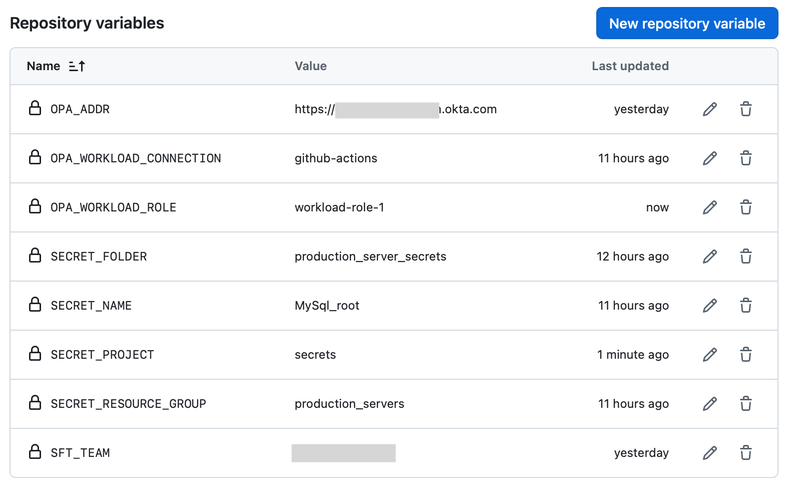
The lab uses repository Variables, not GitHub Secrets, for configuration such as the OPA tenant URL, team name, workload connection, workload role, and target server. That distinction matters: the workflow still has configuration, but it does not need a long-lived OPA API key or SSH private key to bootstrap access.
First, allow the workflow to request an OIDC token:
permissions:
  contents: read
  id-token: write
Then request a GitHub OIDC token with the audience expected by the Okta Privileged Access workload connection. In the lab, I use the OPA tenant URL as the audience:
OPA_ADDR="https://acme.pam.okta.com"

TOKEN_RESPONSE="$(curl -sSfL \
  -H "Authorization: bearer ${ACTIONS_ID_TOKEN_REQUEST_TOKEN}" \
  "${ACTIONS_ID_TOKEN_REQUEST_URL}&audience=${OPA_ADDR}")"

GITHUB_OIDC_TOKEN="$(echo "${TOKEN_RESPONSE}" | jq -r '.value')"
echo "::add-mask::${GITHUB_OIDC_TOKEN}"
export GITHUB_OIDC_TOKEN
Authenticate the workload:
export OPA_ADDR="https://acme.pam.okta.com"

OPA_TOKEN="$(sft wl authenticate \
  --team "acme" \
  --connection "github-actions-prod" \
  --jwt-env GITHUB_OIDC_TOKEN \
  --role-hint "prod-deployer")"

echo "::add-mask::${OPA_TOKEN}"
export OPA_TOKEN
Then use whatever policy allows. For a quick SSH smoke test:
script -q -e -c \
  "sft ssh 'prod-web-01' --command 'whoami && hostname && uname -a'" \
  /dev/null
The current lab does not execute secret retrieval. The main branch focuses on the supported SSH path, with other workload use cases tracked as future additions.
The deployment script around these commands can change. The identity pattern should not: start from a runtime workload token, exchange it with OPA, and use only the access allowed by policy.
Design Guardrails #
Remember that a workload identity integration is privileged identity infrastructure. Treat it that way.
- Scope claims tightly: repository plus branch, workflow, tag, or environment.
- Use short token TTLs aligned to expected runtime.
- Separate DevOps operators from security activation operators.
- Use dedicated workload roles per app, environment, and access pattern.
- Treat AI agents as workload identities when they execute infrastructure actions.
- Avoid printing JWTs, OPA tokens, or revealed secrets.
- Prefer protected GitHub environments or equivalent release controls.
- If a GitHub-hosted runner needs temporary network access, prefer a just-in-time
/32rule and remove it with analways()cleanup step. The lab demonstrates this for AWS Security Groups using GitHub OIDC instead of static AWS keys.
Do not replace one shared secret with one shared workload role. If every automation job maps to the same role, you have recreated a broad service account with a nicer authentication flow.
Conclusion #
Workload identity for automation is one of those features that feels small in the release notes but changes the architecture conversation.
Instead of asking a CI/CD pipeline, automation script, or AI agent to hold a permanent key, Okta Privileged Access Workloads lets the workload prove its identity at runtime. Okta validates the token, maps it to a workload role, applies policy, and issues short-lived SSH access for the server the workload is allowed to reach.
For me, the value is not only removing static bootstrap secrets. It is better governance for non-human access. Automation keeps moving, but access becomes easier to scope, audit, and revoke.
What is your take? Are your pipelines already using workload identity, or are static secrets still hiding in too many places?
-
Okta Privileged Access Platform release notes, version 2026.04.0, deployed April 07, 2026. ↩︎
-
Okta Blog: Okta Privileged Access now supports workload identity for automation, published April 07, 2026. ↩︎
-
okta-lab-workloads GitHub repository, a community lab for testing OPA Workloads with GitHub Actions OIDC and Principal SSH access. ↩︎