
Introduction #
Database accounts are often where identity governance becomes very real. A human administrator may need access to a production database for an incident. A DBA may need an elevated account for maintenance. A legacy application may still keep named users inside MySQL or PostgreSQL, separate from the identity lifecycle you already manage in Okta.
In my previous article, Okta On-premises Connector for Generic Databases, I focused on database governance and lifecycle automation: how to use the Generic JDBC Connector, the Okta Provisioning Agent, and the On-prem SCIM Server to create, update, deactivate, and govern database-backed user records.
The new Early Access feature Securing Privileged Access to Databases looks at the problem from another angle: privileged access management. Instead of provisioning application users into a database schema, Okta Privileged Access discovers database user accounts, vaults their credentials, rotates passwords, and lets authorized users check out credentials based on policy.
Think of the two approaches as complementary:
- Generic JDBC Connector: lifecycle and governance for users and entitlements stored in databases.
- Okta Privileged Access for databases: privileged credential control for database accounts, including checkout, rotation, policy enforcement, and audit events.
Both matter. Governance answers “who should have an account or entitlement?” Privileged access answers “when, why, and under which controls can someone use this sensitive credential?”
What the Feature Does #
Okta Privileged Access for databases helps reduce the risk of static, under-managed database accounts. According to the Okta documentation, the workflow is based on four core actions:
- Discover database accounts using rules that you define.
- Vault credentials for the discovered accounts.
- Rotate credentials automatically on a schedule and when a checkout expires.
- Grant access through policy, including controls such as MFA and manual approvals.
All actions are logged to the Okta System Log, which is important for audit, investigation, and compliance evidence.
At the moment, the Early Access documentation lists support for:
- MySQL 8.0.27
- PostgreSQL 14 and later
This is not a general JDBC-based connector. It is a database privileged access feature with a specific integration model, a dedicated gateway role, and a currently limited list of supported database engines.
Okta’s public launch article frames the same problem in a useful way: sensitive enterprise data now lives across databases, cloud-managed services, and hybrid environments. That makes static database credentials, shared users, and manual rotation practices harder to defend and audit. This feature is a practical step toward Zero Standing Privileges, using vaulting, rotation, policy-based checkout, and auditability today.
Architecture #
The architecture introduces an Okta Privileged Access gateway configured as an Infrastructure Orchestrator. This is distinct from the Server access proxy role used for SSH and RDP brokering. A database integration requires its own orchestrator enrollment and setup token.
At a high level:
- Okta Privileged Access stores the resource model, policies, vaulted credentials, and access events.
- A gateway with the Infrastructure Orchestrator role reaches the target database endpoint from your network.
- The integration user connects to the database with the required administrative privileges.
- Account rules decide which database accounts become managed resources.
- Policies decide who can check out credentials, under which conditions, and with which controls.
- Credential rotation reduces the lifetime of static passwords.
sequenceDiagram
    participant Admin as "OPA Resource Admin"
    participant Okta as "Okta Privileged Access"
    participant Gateway as "OPA Gateway (Infrastructure Orchestrator)"
    participant DB as "MySQL or PostgreSQL"
    participant User as "Authorized User"

    Admin->>Okta: Create integration and account rules
    Okta->>Gateway: Send orchestration task
    Gateway->>DB: Connect with integration user
    DB-->>Gateway: Return matching database accounts
    Gateway-->>Okta: Publish discovered accounts
    Admin->>Okta: Add account rules to policy
    User->>Okta: Request credential checkout
    Okta->>User: Enforce policy controls
    Okta-->>User: Provide approved credential access
    Okta->>Gateway: Rotate credential on schedule or checkout expiry
    Gateway->>DB: Update managed account password
Run the Ready-to-Use Lab #
Reading a feature guide is useful. Seeing discovery, credential checkout, and post-checkout rotation happen against a real database is better.
I created Okta Privileged Access Database Accounts Lab, a self-contained Docker Compose environment for testing this Early Access feature with a MySQL 8.0.27 instance, DBGate, and an OPA gateway configured as an Infrastructure Orchestrator.
Not an Official Okta Product This is an independent community project for testing and demonstration. It is not officially supported by Okta. Use it only in a non-production environment and follow your organization’s security review process.
The lab gives you three useful building blocks:
- MySQL 8.0.27 with preloaded DBA, service, and reporting accounts, so account rules can demonstrate selective discovery.
- DBGate at
http://localhost:8090, making it easy to inspect MySQL users and verify the result of the test. - An OPA gateway container that reads an Infrastructure Orchestrator setup token from the lab environment and reaches the database over the Docker network.
Start it with:
git clone https://github.com/fabiograsso/okta-lab-opa-db
cd okta-lab-opa-db
cp .env-sample .env
make build
make start
The database defaults are intended for a lab. Add your Infrastructure Orchestrator setup token to .env as SFT_SETUP_TOKEN=<token>, then run make restart so the gateway can enroll in your tenant.
Prove the End-to-End Flow #
After you create the integration against db:3306, add account rules, and publish a database policy, check out a managed account in My Privileged Access > Databases. For example, the lab README uses:
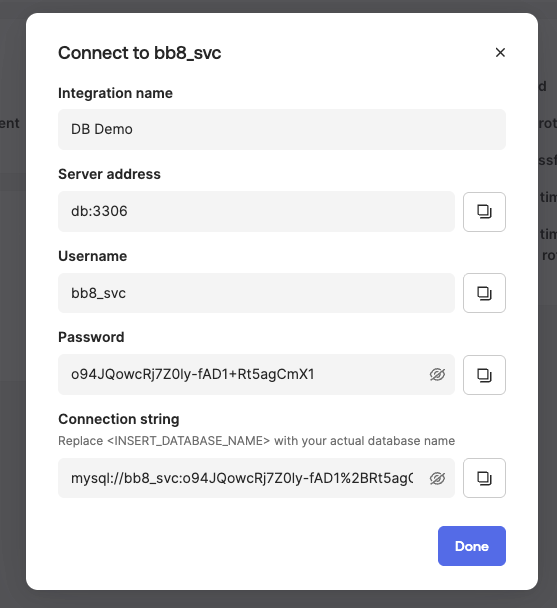
mysql -h 127.0.0.1 -P 3306 -u c3po_svc -pUse the password revealed during the OPA checkout. When the checkout ends, OPA rotates the password. A second connection needs a newly checked-out credential. That is the simplest practical demonstration that the account has moved from a known static password to a managed credential lifecycle.
For the complete lab walkthrough, including screenshots, discovery-rule examples, and troubleshooting, see the lab README and the Okta configuration guide.
Why This Complements Database Governance #
The Generic JDBC Connector article shows how Okta can manage identity data in a database using provisioning workflows. That pattern is ideal when the database is the identity store behind an application, or when the application exposes users and entitlements through relational tables.
Okta Privileged Access for databases is different. It focuses on database accounts themselves, especially privileged or sensitive accounts that need controlled use.
Here is a practical way to separate the use cases:
| Use case | Better fit |
|---|---|
| Create or deactivate application users stored in database tables | Generic JDBC Connector |
| Import users and entitlements from a custom database | Generic JDBC Connector |
| Automate joiner, mover, leaver workflows into a database-backed app | Generic JDBC Connector |
| Discover database login accounts | Okta Privileged Access database integration |
| Vault and rotate database account passwords | Okta Privileged Access database integration |
| Require MFA or approval before someone uses a privileged database credential | Okta Privileged Access database policy |
In a mature identity program, you may use both. The JDBC connector governs who should exist and what they should be entitled to. Okta Privileged Access controls sensitive credential use when direct database access is needed.
Configuration Flow #
Whether you use the lab or your own infrastructure, follow this sequence in order:
- Review and fulfill the prerequisites.
- Create a resource group and project.
- Install the gateway.
- Create setup tokens.
- Configure gateway for database integration.
- Add database integration.
- Add account rules.
- Add rules to a policy.
Let’s walk through what each step means and where the important decisions are.
1. Review the Prerequisites #
Before you start, you need the right Okta Privileged Access role and a database-side integration user.
The Okta documentation calls out these prerequisites:
- You must be a member of the Okta Privileged Access resource admin group.
- You need a dedicated database user for the integration.
- The integration user must be able to discover accounts, rotate passwords, and manage access for the database integration.
- The gateway must have outbound connectivity to both Okta Privileged Access and the target database endpoint.
- The gateway must reach the target database host and port through your network and firewall rules.
For database permissions, Okta documents different requirements for MySQL and PostgreSQL.
For MySQL, baseline discovery requires permissions such as SELECT on mysql.user, SELECT on mysql.role_edges for MySQL 8.0+, SHOW DATABASES, and RELOAD. Rotation needs account-management capability such as CREATE USER, and session termination requires CONNECTION_ADMIN on MySQL 8.0+ or SUPER.
For PostgreSQL, Okta documents capabilities for collecting users and roles, managing roles, and terminating sessions. The key database-side attribute for credential rotation is CREATEROLE. For session termination, Okta lists options such as superuser capability, pg_signal_backend membership, or execute permission on pg_terminate_backend(int), with pg_signal_backend as the preferred role.
2. Create a Resource Group and Project #
In Okta Privileged Access, resource groups and projects organize what is managed and who can administer it.
For database access, this structure matters because account rules assign discovered database accounts into a resource group and project. Policies can then target those resources and define who can check out credentials.
A simple lab structure could look like this:
- Resource group:
Database Privileged Access - Project:
PostgreSQL Production - Project:
MySQL Production - Project:
Database Lab
For production, I would separate environments and ownership boundaries. A DBA team, a data platform team, and an application team may need different policies, approval chains, and audit expectations.
3. Install the Gateway #
The gateway is the bridge between Okta Privileged Access and your database network. For this feature, the gateway must be able to reach:
- The Okta Privileged Access service.
- The target database host and port.
Network configuration depends on where the database lives:
| Environment | What to configure |
|---|---|
| AWS | Security group inbound rule on the DB port from the gateway private IP or security group |
| GCP | VPC firewall ingress rule on the DB port from the gateway instance |
| Azure | Network Security Group inbound rule on the DB port from the gateway |
| On-premises | Firewall rules and routing between the gateway host and database host |
This is where many integrations fail in practice. If the Okta UI returns a connection error during Test and Save integration, validate the path from the gateway host to the database first: DNS resolution, route, firewall, database listener, TLS requirements, and port.
4. Create Setup Tokens #
Setup tokens enroll gateways into Okta Privileged Access with a specific role. For database integration, the role is critical.
Do not reuse a setup token from an existing Server access proxy deployment. In production, I recommend a dedicated gateway for database integrations: it gives the database path its own network rules, ownership model, and troubleshooting boundary.
5. Configure the Gateway for Database Integration #
After installing the gateway, configure it as an orchestrator.
Okta documents a small YAML configuration file:
# Orchestrator
Orchestrator:
  Enabled: true
The setup token must be saved in:
/var/lib/sft-gatewayd/setup.tokenThen start and validate the gateway service:
sudo systemctl start sft-gatewayd
sudo systemctl status sft-gatewayd
journalctl -u sft-gatewayd
When enrollment is successful, the gateway should appear under Resource Administration > Gateways with the Infrastructure Orchestrator role.
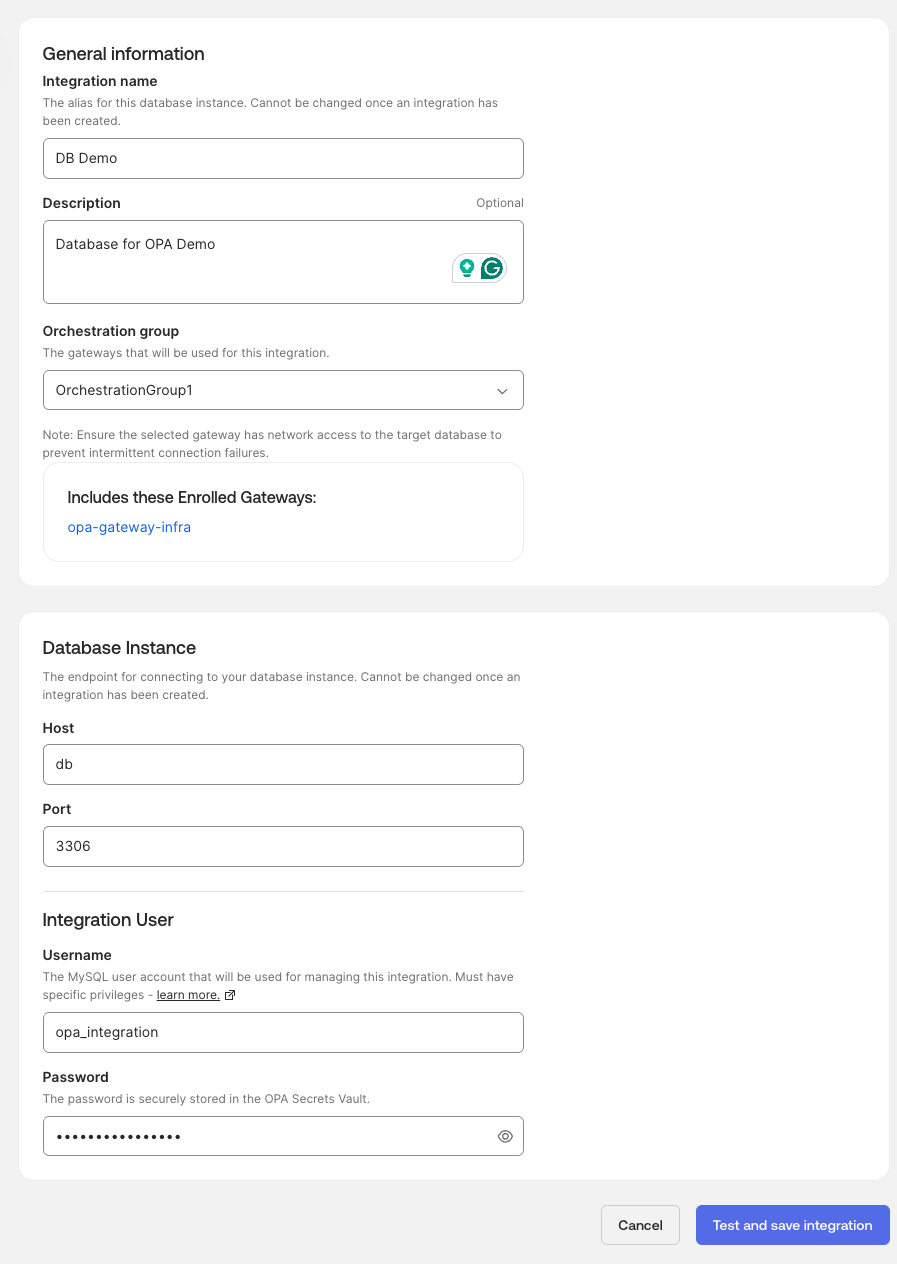
6. Add a Database Integration #
Each database instance needs its own integration. This makes sense because host, port, database engine, integration credentials, and ownership may differ per instance.
In Okta Privileged Access:
- Go to Resource Administration > Integrations.
- Set Resource type to Databases.
- Click Add Integration.
- Select the database type.
- Enter an integration name and optional description.
- Select the orchestration group.
- Enter the database hostname and port.
- Enter the integration user credentials.
- Click Test and Save integration.
The hostname and port are used by the gateway, not by your browser. If your laptop can connect but the gateway cannot, the integration test can still fail.
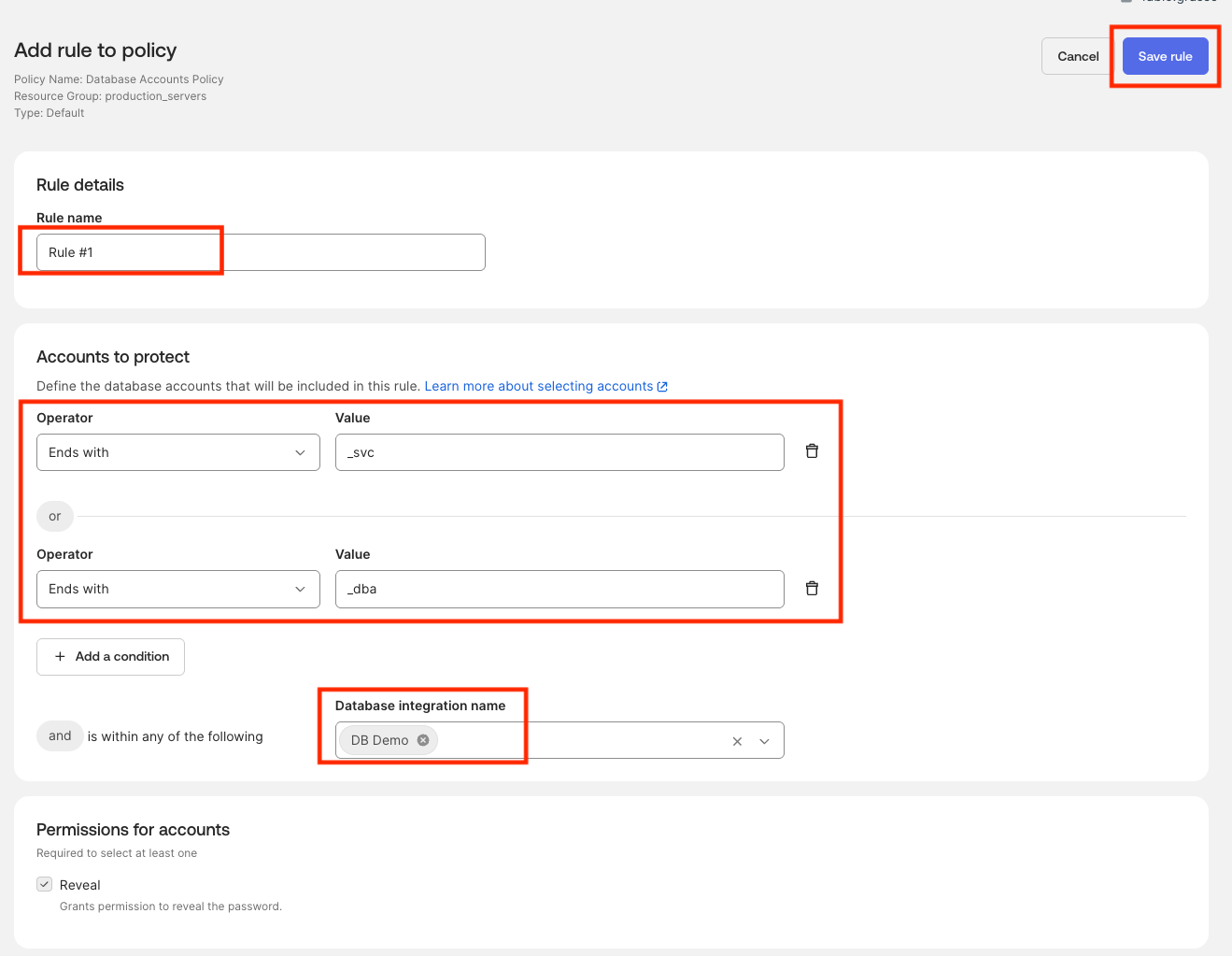
7. Add Account Rules #
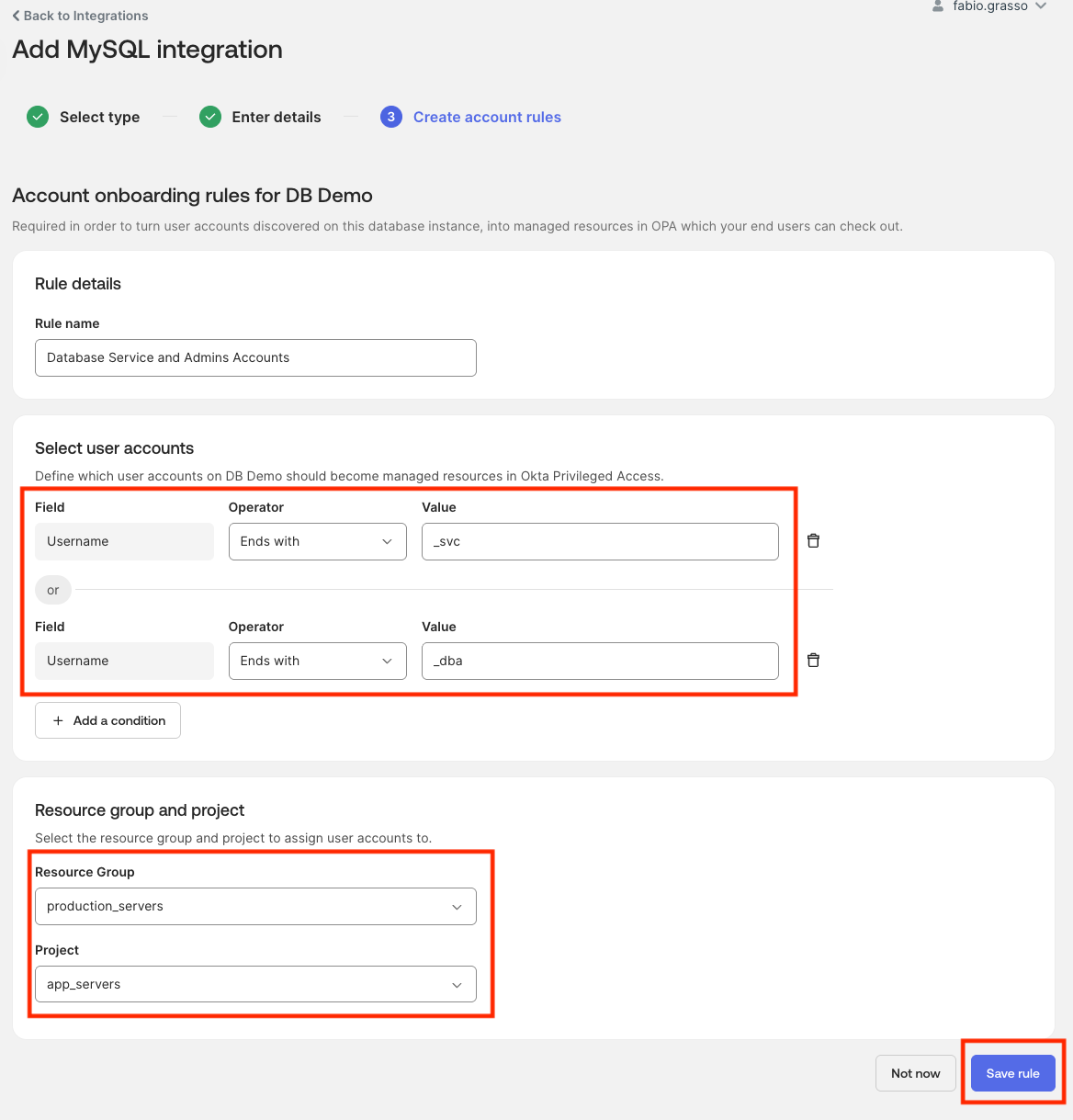
Account rules decide which database accounts become managed resources in Okta Privileged Access.
The rule flow is simple:
- Enter a rule name.
- Select an operator and value.
- Optionally add more conditions.
- Assign matching database accounts to a resource group and project.
- Save the rule.
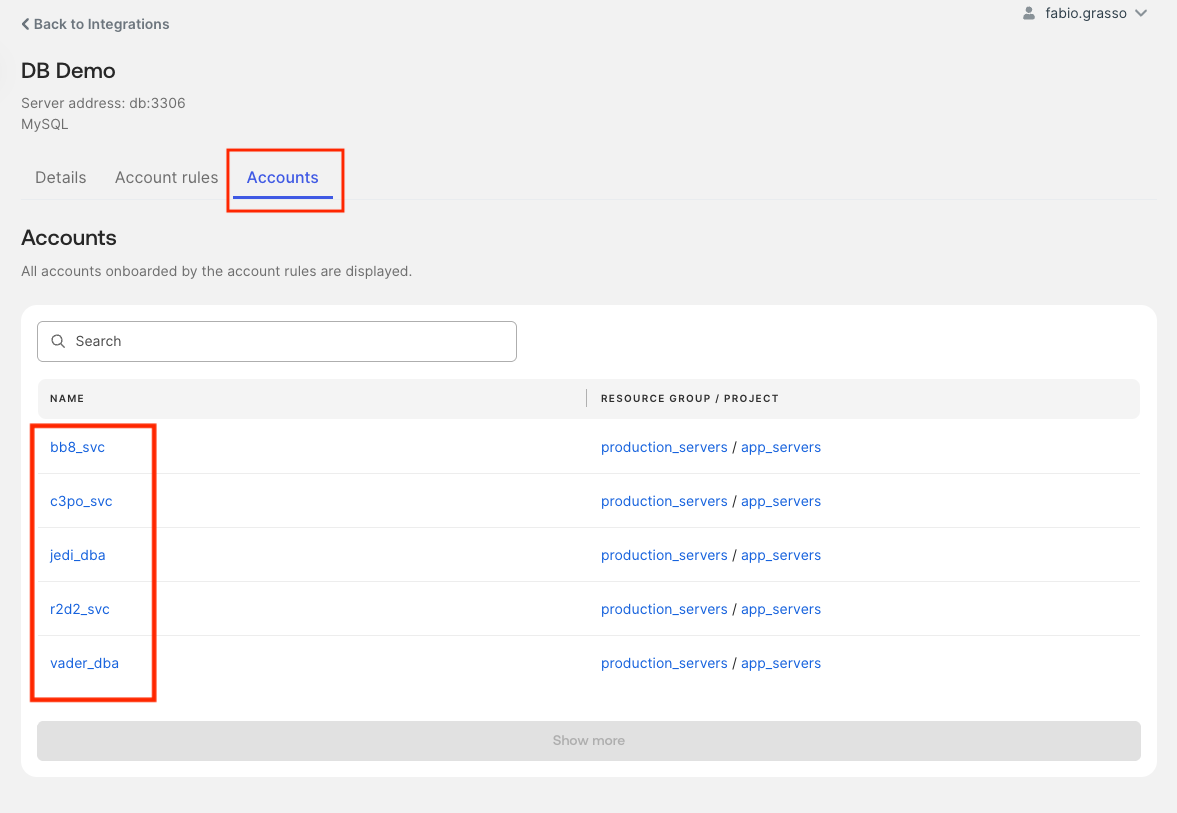
- Return to the Accounts tab after sync completes.
Okta documents that discovery runs automatically every 24 hours. You can also trigger discovery manually with Sync now from the database integration actions menu.
Start conservatively. Onboard one test account, validate rotation and checkout, then expand to a controlled set of privileged accounts. The lab provides useful test patterns, such as usernames ending in _dba or _svc, but production rules should reflect actual account ownership and usage.
8. Add Rules to a Policy #
Discovery and vaulting are only half of the story. Policies define who can access the credential and what controls apply.
For database privileged access, consider policy rules that include:
- User or group eligibility.
- MFA requirements before checkout.
- Manual approval for production databases.
- Time-bounded access.
- Checkout expiration that triggers credential rotation.
- Different requirements for production, staging, and lab databases.
For example:
| Database resource | Eligible users | Controls |
|---|---|---|
| Production DBA accounts | DBA group | MFA plus manager or resource owner approval |
| Break-glass account | Small emergency group | MFA, approval, short checkout duration |
| Lab database admin | Engineering lab group | MFA, no approval, short rotation interval |
The key design principle is least privilege with operational realism. If the process is too heavy, teams will look for workarounds. If it is too loose, you are just moving static credentials into a nicer interface.
Once the policy is published, authorized users can open My Privileged Access > Databases, select a managed account, and reveal the credentials for the approved checkout window. The connection string is useful for a quick DBA workflow, while the password rotation that follows checkout prevents it from becoming a reusable static secret.
Operational Guardrails #
This Early Access feature changes the lifecycle of sensitive credentials, so the rollout deserves care.
Start with Non-Production #
Password rotation is intentionally disruptive to static credential habits. That is the point. But it means you need to identify automation first.
Before onboarding an account, ask:
- Is this used by a person, service, batch job, application, or monitoring tool?
- Is the password stored anywhere outside Okta Privileged Access?
- Who owns the account?
- What happens if the password rotates immediately after checkout expiry?
- Is there a break-glass procedure if the database or gateway is unavailable?
Monitor the System Log #
Okta documents that actions are logged to the System Log. Use that from day one. For a production design, I would forward relevant events to your SIEM and build detections for failed checkouts, policy denials, unexpected rotations, and repeated integration errors.
Document the Integration User #
The integration user is a sensitive administrative account. Track where it exists, which permissions it has, how it is protected, and who can rotate or recover it. This is especially important because it has the authority needed to discover accounts and rotate credentials.
Support Boundaries #
The current Early Access documentation highlights these practical boundaries:
- The feature requires an Okta Privileged Access gateway configured for database orchestration.
- The gateway setup token must use the Infrastructure orchestrator gateway role.
- MySQL and PostgreSQL are the currently documented database engines.
There are also operational boundaries to validate in your own environment:
- High availability design for the gateway.
- Network reachability to private database endpoints.
- Behavior with managed database services and restricted admin permissions.
- Compatibility with existing DBA workflows.
- Impact on automation that uses database-native accounts.
Conclusion #
Okta Privileged Access for databases brings a useful control plane to one of the most sensitive areas of identity security: database credentials. It helps teams move away from shared, static, under-managed passwords and toward governed checkout, policy controls, rotation, and audit visibility.
For me, the interesting part is how it complements database governance. The Generic JDBC Connector helps automate lifecycle and entitlement management for database-backed applications. Okta Privileged Access for databases helps secure the privileged database accounts that humans may need to use directly.
Used together, they create a more complete identity story for databases: govern who should exist, control who can access privileged credentials, rotate what should not remain static, and keep evidence in the audit trail.
Ready to try it? Start with the ready-to-use Docker lab, one non-production MySQL instance, one dedicated orchestrator gateway, one test account, and one strict policy. Then expand only after you have proven discovery, checkout, rotation, logging, and recovery.
What’s your take on database privileged access? Are you already centralizing DBA credential checkout, or are static database passwords still hiding in too many places?
References #
- Okta Docs: Manage database accounts
- Okta Docs: Database integration prerequisites
- Okta Docs: Set up database integration
- Okta Docs: Configure gateway for database integration
- Okta Docs: Add database integration
- Okta Docs: Permissions for database access
- Okta Blog: Securing privileged access to databases with Okta
- Okta Privileged Access Database Accounts Lab
- Lab: Okta configuration guide
- Related article: Okta On-premises Connector for Generic Databases